Bring Your Own LLM Keys
Watch a complete BYOK setup and first task run.
Model control without workflow friction
Plan with top-tier models, execute with lower-cost models, and switch anytime.
Neo separates orchestration from model billing. Use Opus 4.7 or GPT 5.5 for planning, switch to Qwen 3.6 27B (OpenRouter) or GPT 5.4 mini (OpenAI) for execution-heavy loops, then switch back when quality or complexity changes.
Why teams use BYOK
Bundled model layers hide cost decisions at the exact moment teams need control. BYOK keeps provider choice explicit, so you can optimize for quality, speed, and budget per phase.
Neo keeps orchestration stable while your model routing stays flexible.
Model strategy by phase
Planning and architecture
Prioritize reasoning quality when defining approach, decomposition, and risk handling.
Execution and iteration
Prioritize cost efficiency for repetitive coding, retries, and test-driven loops.
Reswitch anytime: If complexity spikes, move back to a stronger model for critical steps, then return to a cheaper model for bulk execution.
Supported providers
Connect the provider stack you already use. Neo does not hide routing behind a bundled model abstraction.
Anthropic
Use your Claude API key directly in Neo for planning and high-judgment workflow decisions.
OpenAI
Use OpenAI models for both premium planning and lower-cost execution paths with one provider account.
OpenRouter
Route through OpenRouter when you want broad model coverage and quick provider-level model switching.
Visual guide
Add screenshots in these reserved blocks. The layout is ready, so you can drop assets later without reworking page structure.
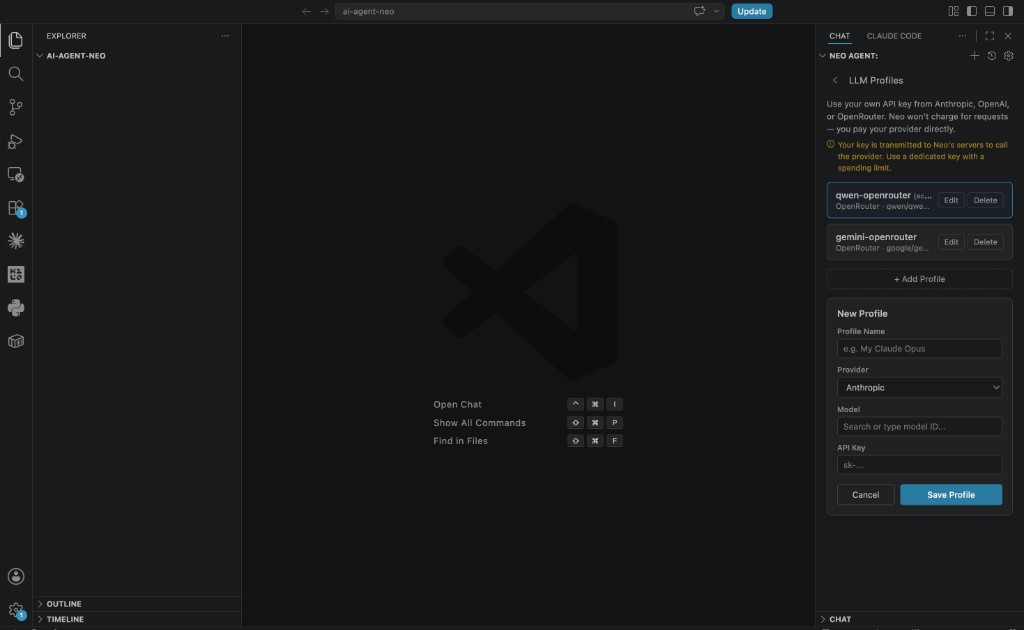
Provider key setup screen
Neo settings with provider profiles and API key setup.
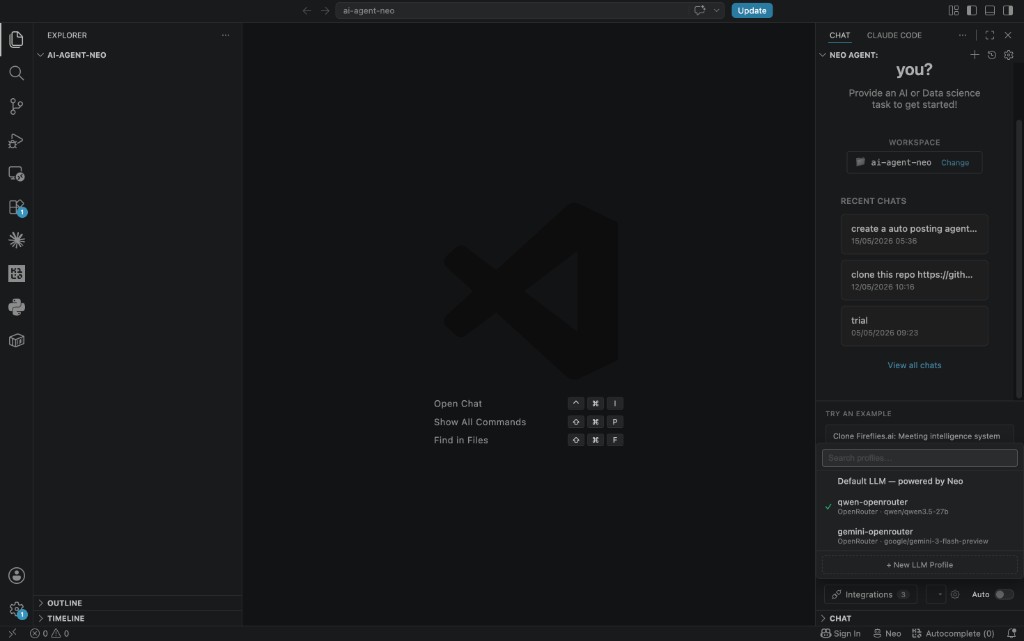
Model selection by phase
Switch between saved LLM profiles directly from the chat panel.
How billing works
Connect your key and run Neo normally. Neo executes the workflow, but your provider remains the model and billing system.
Add your provider key
Add your key in Neo settings for Anthropic, OpenAI, or OpenRouter.
Choose the model strategy
Use stronger models for planning, then switch to lower-cost models for execution-heavy loops.
Provider bills your account
Usage is charged directly in your provider account, with your existing limits and alerts.
No hidden routing layer: You can inspect and govern spend in the provider dashboard your team already uses.
Quick setup
Set up your own LLM key in a few minutes.
Open Neo settings
Open key settings from your Neo dashboard or editor integration.
Go to provider keys
Navigate to API keys / provider keys.
Add your key
Add one or more keys for Anthropic, OpenAI, and/or OpenRouter.
Save, test, and switch
Run one quick planning task and one execution task to validate your model-switch flow.
Best practices
Separate key scopes by environment
Use different keys for production workflows, staging runs, and experiments.
Enable usage guardrails
Configure provider-side budget alerts, hard spend limits, and anomaly notifications.
Rotate keys regularly
Rotate keys on a schedule and immediately after any possible key exposure.
Use trusted storage only
Store and manage keys only in controlled settings with team access policies.
Security notes
Clear boundary: You own provider accounts, keys, limits, and spend policy. Neo handles workflow orchestration, not provider billing ownership.
FAQ and troubleshooting
Does Neo bill me for LLM requests?
No. In bring-your-own-key mode, model usage is billed by your provider.
Which provider should I use?
Use the provider you already manage for billing, limits, and observability.
If you need access to multiple model families through one endpoint, OpenRouter can be useful.
Can I switch providers later?
Yes. You can update provider keys and switch provider/model strategy as requirements change.
What if a key is invalid?
Requests to that provider will fail until the key is corrected.
Re-save the key in settings and run a quick validation task.